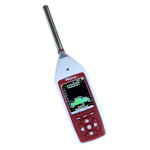
Real-Time Analyser with 1/3 Octave Band Filters
|
|
|
| |
Using the Real-Time Analyser
The P33 is a very powerful meter that can measure different
parameters simultaneously and be configured in many different
ways. However, once configured (usually the default settings
are fine), it is extremely quick and easy to use.
The examples below are for specific applications and should
give a good idea on how to use the meter. Once configured for
other applications, actual use is pretty much the same, no
matter what parameters you are measuring.
For most applications you need:
- LAeq,t - usually shortened to Leq and shown on the meter's
display as LAt
- LCPeak - the C - weighted Peak, used for occupational noise
measurement
- L90 - Level exceeded for 90% of the time, for environmental
noise surveys
- Octave or 1/3 Octave Band Spectrum
|
 |
Broadband Noise Measurements
 |
Starting the Measurement
Press the Record key to start
a measurement. This key tells the meter to start and to automatically
save the measurement.
If the time integration time T has been
set then the meter will also store all the parameters (Leq,
Max, Min, Ln, etc.) every T seconds.
During the measurement you can view different parameters
and frequency weightings without interrupting it. |
 |
| |
|
|
|
|
|
| |
|
|
 |
Finishing the Measurement
To end a measurement press the Stop key.
The measurement will be stored and the meter returned to its
stopped state, showing the results of the last measurement.
You can use the Screen key (shared with
OK) to view the different parameters such
as the Lns (L10, L90, etc.) and to display the time history
graph of the noise. |
 |
| |
|
|
Octave and 1/3 Octave Band Measurements
 |
Selecting Octave or 1/3 Octave Band Mode
By default the meter switches on in broadband mode. Switch to
Octave Band by pressing the Mode key (shared
with Cancel). Press the Mode key
again to select 1/3 Octave Bands.
If you find that you make more frequency analysis measurements
than broadband then you can set the meter to automatically
start up in either Octave or 1/3 Octave band mode. |
|
| |
|
|
|
|
|
| |
|
|
 |
Starting the Measurement
Press the Record key to instruct the
meter to start and to automatically save the measurement.
If an integration time T has been set then
the meter will store the spectrum every T seconds too.
It can also be set to store a spectrum every 1/8 of a second
(125 ms). |
 |
| |
|
|
|
|
|
| |
|
|
 |
Finishing the Measurement
To end a measurement press the Stop key.
You can use the Screen key to view the
levels in each band, displayed in decibels, but with so many
numbers it is usually better to download the measurement
to a computer for viewing graphically. |
 |
|
|
|
|
|
| Order Code | Description | | Price | Purchase | | P33-2 | Type 2 Real Time Analyzer with 1/3 Octave Band Filters |  | €4348,00 |  | | P33-2-K | Type 2 Measurement Kit with Pulsar 33-2, Calibrator and Software |  | €4831,00 |  | | P33-1 | Type 1 Sound Meter with Real Time 1/3 Octaves |  | €5029,00 |  | | P33-1-K | Noise Measurement Kit with Pulsar 33, Calibrator and Software |  | €5570,00 |  | Options  | | | | | | EFM33 | Extended Frequency Module for P33 | | €1217,00 |  | | RT33 | Reverberation Time Module for P33 | | €1187,00 |  | | P105 | Class 1 Acoustic Calibrator. 1kHz, 94dB. For 1/2 inch microphones | | €455,00 |  | | P106 | Class 2 Sound Level Calibrator. 1kHz, 94dB. For 1/2 inch microphones | | €323,00 |  | | UA237 | 90mm Windshield for 1/2 inch Microphone Capsules |  | €24,00 |  | | CRN-005 | 5m Microphone Extension Cable for Pulsar 30 and 33 |  | €158,00 |  | | CRN-010 | 10m Microphone Extension Cable for Pulsar 30 and Pulsar 33 |  | €347,00 |  | | CM270/1 | Tripod Mount for Preamplifier |  | €46,00 |  | | CT1 | Lightweight Tripod |  | €70,00 |  | | CT3 | Tripod |  | €158,00 |  |
VAT and DELIVERY
not included - click for more information
|